

TM 5-3805-296-23-1
0009
CAT COMMUNICATION ADAPTER SOFTWARE INSTALLATION CONTINUED
11. Read and follow on-screen prompts to load communication adapter software.
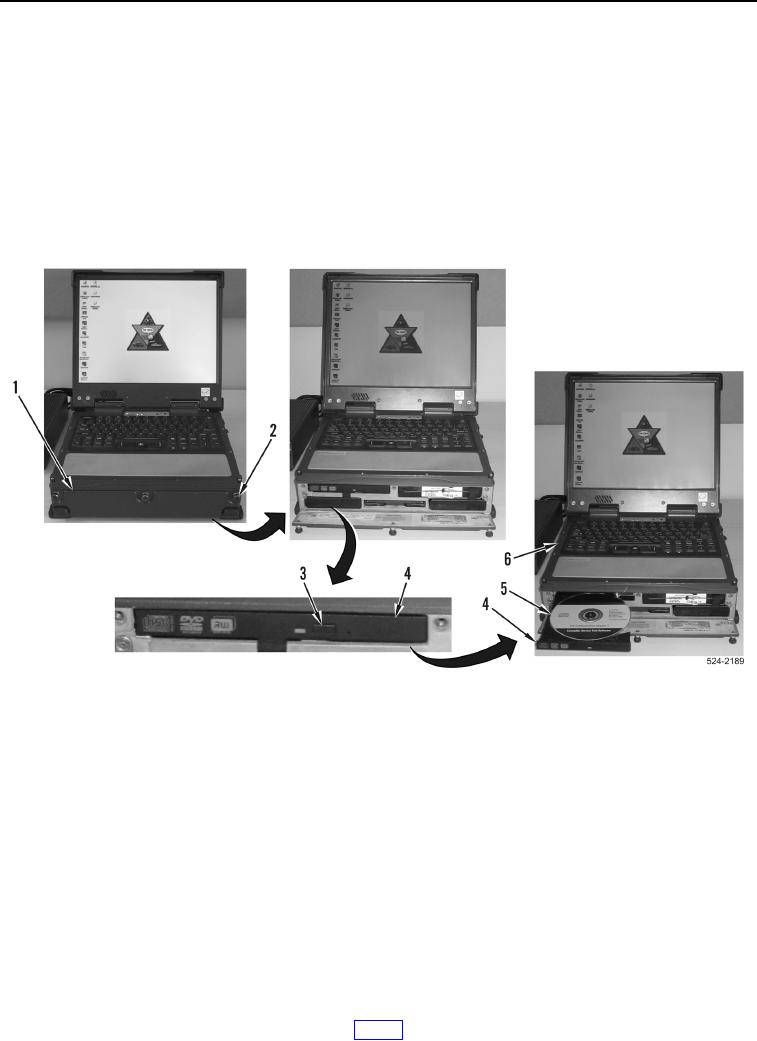
12. Press DVD/CD ROM eject button (Figure 7, Item 3) to open DVD/CD ROM disk drive
(Figure 7, Item 4).
13. Remove Cat Communication Adapter 3 CD (Figure 7, Item 5) from DVD/CD ROM disk drive
(Figure 7, Item 4) and gently close DVD/CD ROM disk drive.
a. If software installation is complete, close peripheral bay access door (Figure 7, Item 1) and install three
fasteners (Figure 7, Item 2) to MSD (Figure 7, Item 6).
b. If not installed, install Electronic Technician (ET) software as described under Electronic Technician (ET)
Software Installation in this work package.
Figure 7. DVD/CD ROM Disk Drive.
0009
END OF TASK