

TM 5-3805-296-10
0004
OPERATOR CONTROLS AND INDICATORS CONTINUED
Heater and Air Conditioning Controls/Rear Wiper Switch
0004
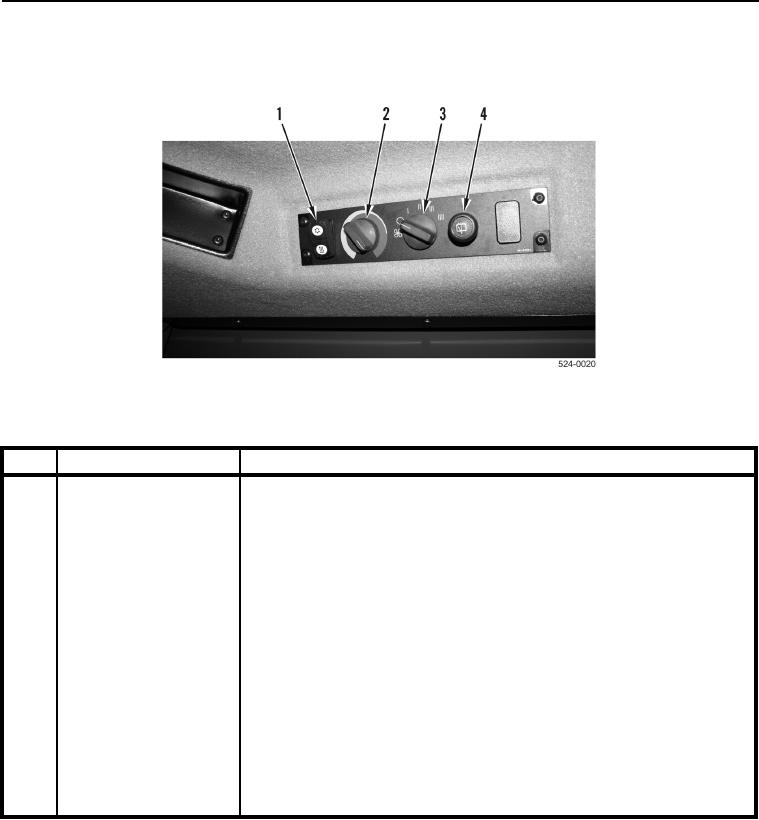
Figure 15. Heater and Air Conditioning Controls/Rear Wiper Switch.
0004
KEY
COMPONENT
DESCRIPTION
1
Heater and Air Condi-
Press top of switch to activate air conditioning.
tioning Switch
Press bottom of switch to activate heater.
Move switch to center position to turn air conditioner or heater off.
2
Temperature Select
Turn knob to adjust temperature from cold (full left) to hot (full right).
Switch
3
Fan Speed Switch
Turn switch counterclockwise to off (O) position. Turn switch clockwise to
operate fan in low (I), medium (II), high (III), and maximum (IIII) speeds.
To pressurize cab to prevent dust entry when neither heating nor cooling is
desired, adjust fan speed and temperature to comfortable levels. DO NOT
activate air conditioning.
4
Rear Wiper/Washer
Turn control knob clockwise to first detent to turn wipers on LOW speed.
Switch
Turn control knob clockwise to second detent to turn wipers on HIGH
speed.
Turn knob counterclockwise to turn wipers off.
Push knob to activate washers.