

TM 3-4240-302-30&P-5
LOCATION
ITEM
ACTION
REMOVAL
Panel
RFI filter FL3
1.
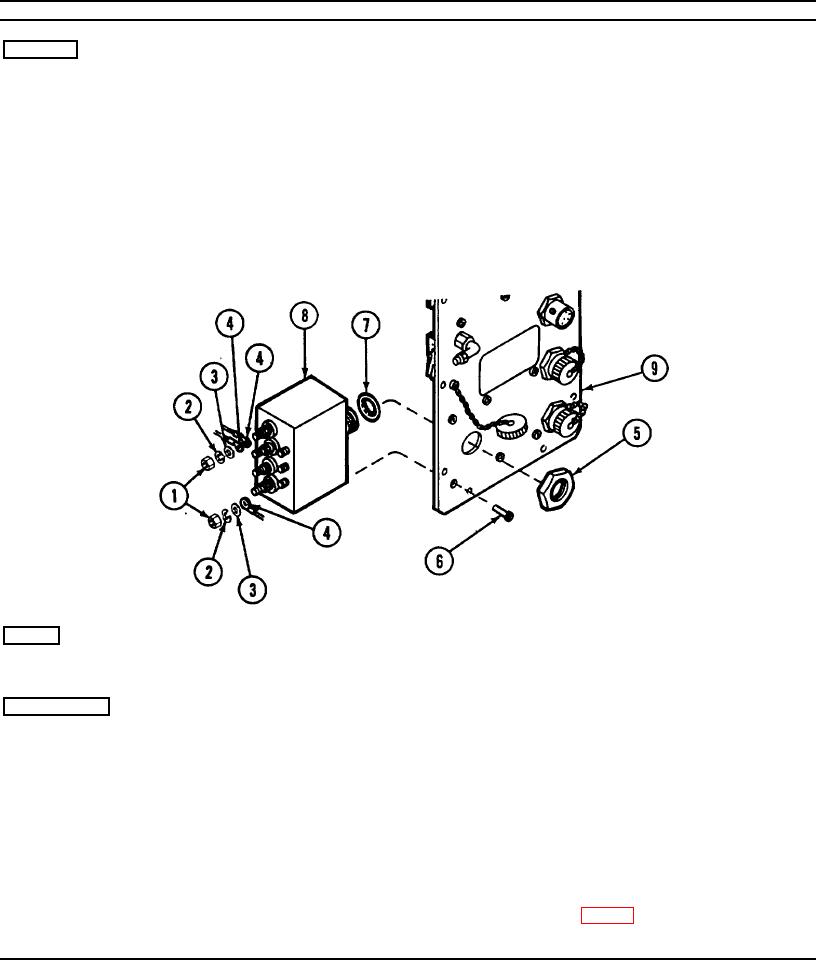
Remove seven nuts (1), lockwashers (2), and
washers (3) from filter terminals, and release
wiring (4). Tag wires.
2.
Unscrew nut (5).
3.
Unscrew four screws (6), and remove RFI filter
FL3 from panel (9).
4.
Remove preformed packing (7) from RFI filter
FL3 (8).
REPAIR
Preformed packing
Replace preformed packing (7) if torn or broken.
INSTALLATION
Panel
RFI filter FL3
1.
Place preformed packing (7) on RFI filter
FL3 (8).
2.
Install RFI filter FL3 in panel (9) using four
screws (6).
3.
Install nut (5).
4.
Connect wires (4) to filter terminals using
washers (3), lockwashers (2), and nuts (1). Refer
to wiring diagram (p. 2-39).
2-31